5G Fleet, Fixed & Portable Connectivity
Deploy high-performance connectivity anywhere with self-contained solutions that enable rapid setup for fleets, temporary sites, field operations, or emergency response.
Enterprise Network Expansion
Extend coverage and capacity across buildings, campuses, and industrial sites with smart, network-controlled repeaters that deliver scalable, secure performance.
Embedded IoT Connectivity
Accelerate product development with pre-certified cellular modems and antenna integration expertise that simplify device connectivity and speed time to market.
Antennas
Maximize wireless performance with rugged, high-efficiency antennas optimized for fleet, enterprise, and IoT applications, designed to simplify installation and maximize signal strength.
AirgainConnect®
5G All-in-One Vehicle Gateway
5G Vehicle & Fixed Router
5G Portable Connectivity
Smart Network Controlled Repeaters
Embedded Modems
Asset Trackers
External Antennas
Embedded Antennas
Accessories
Public Safety & First Responders
Reliable wireless connectivity that keeps dispatch, CAD, video, and field comms connected across jurisdictions.
Hospitality & Retail
Scalable wireless connectivity that enhances guest experiences, POS systems, and operational tools across stores, restaurants, and hotels.
Transportation & Logistics
Always-on connectivity for fleets, asset tracking, and transit systems. Built for roads, rail, and logistics corridors.
Venues
High-density wireless to support peak demand for staff communications, guest applications and media coverage in arenas, convention centers, and outdoor event sites.
Energy & Utilities
Reliable coverage for field crews, remote equipment, and critical infrastructure across both urban, rural and industrial footprints.
Field Services
Mobile connectivity for technicians and service teams working across job sites, fleets, and remote locations.
Industrial & Manufacturing
Wireless for smart factories, automation systems, industrial IoT networks, and large scale monitoring.
Smart Cities
Consistent, resilient connectivity with fast, simple deployments that support municipal services and infrastructure.
Enterprise
Connectivity for large venues, campuses, distributed systems, and device ecosystems that power modern enterprises.
Mobile Network Operators
Extend wireless coverage and support carrier-approved deployments at scale.
System Integrators
Fast-to-deploy wireless connectivity solutions that integrate cleanly into complex, real-world environments.
Value-Added Resellers
Offer differentiated wireless solutions that solve real customer problems without complexity or guesswork.
Distributors
Gain access to a trusted portfolio of wireless connectivity products backed by technical support and global experience.
Technology Partners
Build integrated, interoperable solutions that push performance and reliability further.
Customer Stories
See how organizations use Airgain solutions to solve complex wireless challenges in the field.
White Papers
Technical perspectives on wireless performance, deployment strategies, and the technologies shaping modern wireless connectivity.
eBooks
In-depth guides exploring wireless challenges, industry trends, and practical strategies for improving connectivity.
Blog
Insights and updates on wireless trends, use cases, and what actually matters in the real world.
Videos
Quick, practical videos showcasing Airgain products, deployments, and expert insights.
About
25 years of RF innovation that helps organizations stay connected where it matters most.
Leadership
Meet the team guiding Airgain’s strategy, innovation, and growth across global markets.
Investor Relations
Information and updates for investors, including financial performance, press, and governance.
News/Press
Events
Careers
The Airgain Customer Portal makes it easy to request technical support, track existing tickets, and communicate with our Support team.
Follow these six steps to submit and manage your support request.
Visit the Airgain Customer Portal and sign in with your registered email and password.
If you’re a new user:
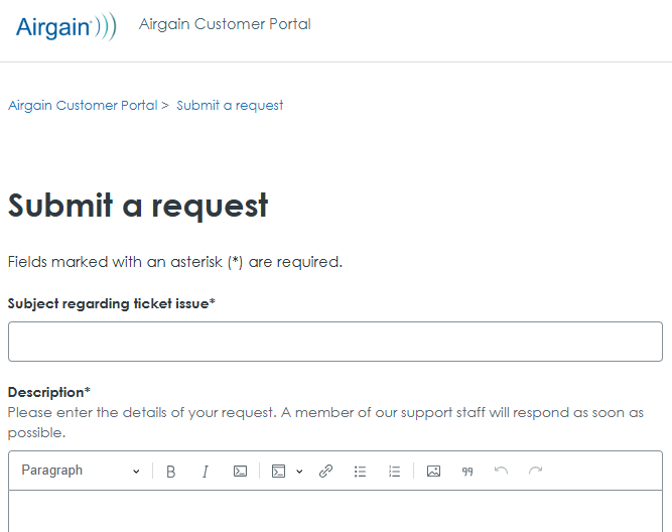
Once logged in, select Submit a Request from the top navigation menu.
This will open the support ticket submission form.
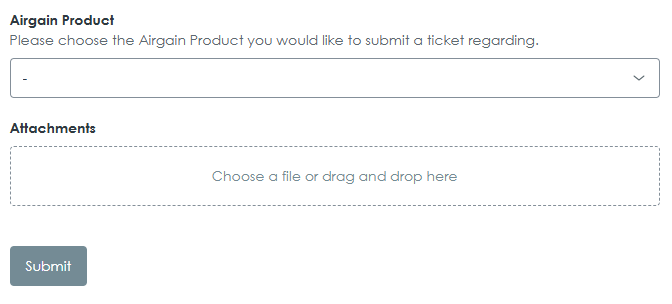
Choose the Airgain product or issue category that best matches your request. This helps route your ticket to the appropriate Support team.
Review your information for accuracy, then click Submit to send your ticket to Airgain Support.
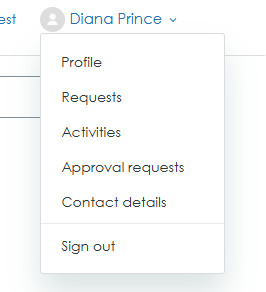
After submitting your request, select Requests in the Customer Portal to view your ticket status.
You can communicate with our Support team in two ways:
You’ll receive email notifications as updates are made to your ticket.
You must verify your email address after registering before you can submit a support ticket.
Sign in to the Customer Portal and select Requests to check your ticket status or respond to our Support team.